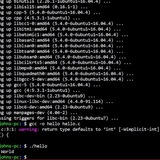
How to bypass "exec &> logfile" and show echo messages on the screen
I do have a very old and long script that is spitting everything to the log file, but gives no output on the screen. This make a problem as script is running in the background and user think it hanged or crashed.
I would like to add some "milestone messages" when part of script is done and these messages would be shown on the screen for the user, but can't figure out how to make it.
recent example script:
#!/bin/bash
set -xeo pipefail
exec &> setup_script.log
echo "test message"
recent output on the screen:
`+ exec`
https://redd.it/1cbvxmx
@r_bash
Send a program receiving piped input into a debugger (gdb)?
Hello. I have a small program.c that takes one line of text, evaluates the input, and then exits. To get the program to run successfully (return 0 and exit), I pipe some hex (non-printable ascii) characters to it. This causes the program to run and exit fine. What I'd like to do is step through this program.c once it's been fed the hex values, but before executing, using gdb.
So far I've tried every combination of piping, redirection and command substitution that I can think of, but it either hangs or the program finishes executing before gdb can open it.
I've also read in gdb's pages that it can open a program based on a pid, so I tried that with a split screen terminal, but apparently this little .c program doesn't create a pid, even when I open it and let it wait for input.
Some (failed/laughable) examples of what I've tried that hopefully show the logic of what I'd like to do:gdb "$( (printf "some text"; printf "\xsomehex") | ./program.c )"(printf "some text"; printf "\xsomehex") >>> ./program.c | gdb(printf "some text"; printf "\xsomehex") | gdb ./program.cx="$( (printf "some text"; printf "\xsomehex") )"; gdb program.c < $x
For what it's worth, I've already stepped through gdb and entered/replaced the strings manually in memory at the appropriate input points, but there's some extra behaviour that I'd like to investigate which only seems to happen when I pipe the text from the command line. So I'm hoping to catch a "snapshot" of the program in that state before it starts executing.
Happy to provide more details if that helps. Left off for brevity's sake.
Basically I'm asking this in r/bash because I'm wondering if this sequence is even possible, or if it's like trying to put on your socks after you've already laced up your shoes.
This is running in GNU bash, v5.1.16.
https://redd.it/1cbqif7
@r_bash
Print files whose line of text appear more than once across the files
I have several dozens of text files of a couple of thousands of lines each. I would like to find all the lines that appear more than once across all the files. For example:
# FileA.txt:
cat
dog
bird
horse
# FileB.txt:
elephant
bird
cat
# FileC.txt:
bird
raccoon
lizard
horse
Desired output would be something like:
cat
FileA.txt
FileB.txt
horse
FileA.txt
FileC.txt
bird
FileA.txt
FileB.txt
FileC.txt
Anyone know a performant way to do this? It's straightforward to do it between only 2 files but I have way more than that. Combine all the lines into one file, find duplicate lines in that file, then search for the files for these duplicate lines is the best approach?
https://redd.it/1cbnzf1
@r_bash
Bashcord - Discord in bash (Not exactly discord)
https://github.com/gitipedras/bashcord
I don't know why I decided to make it.
Any Ideas on how to improve?
Not features that discord has.
Feedback PLS.
https://redd.it/1cbcbq5
@r_bash
My first bash script - Hide.me VPN Linux CLI Server Switcher
Hi guys n girl,
i wrote my first bash script because i had a neat usecase and wanted to try out bash for some time.
In my case i wanted to have a easier and more elegant way to switch my VPN Server. I use hide.me atm and they provide a CLI Client for that purpose, but its not the most userfriendly and comfortable implementation.
I am not a dev so dont throw rocks at me :-P
Github/hide.me-server-switch
https://redd.it/1cabqgd
@r_bash
Natural Language Processing in Bash
https://massimo-nazaria.github.io/nlp.html
https://redd.it/1c9j3eo
@r_bash
Which command using this file descriptor?(echo "$BASHPID" ; cat /dev/fd/0)
I can write to first shell, using new shell. echo "hello" >> /proc/PID(BASHPID)/fd/0
This command sequence works but i really dont know how and what happened.
What is /dev/fd/0 here? Is it subshell or cat command?
And why PID(BASHPID) worked in the next command. I am so confused. Please help.
https://redd.it/1c92pmw
@r_bash
Having trouble writing bash script to management multiple git repos
Hello everyone, I have multiple git repos, let's say /home/plugin/, /home/core/, /home/tempate/.
I'm trying to write a bash script that will run git add . && git commit -m $msg && git push origin main on each of them. However my attempt to use cd to get into the appropriate repo isn't working
#!/bin/bash
read -p 'Message: ' msg
declare -a location=(
"core/"
"plugin/"
"template/"
)
dir=$(pwd)
for var in "${location@}"
do
cd "$dir/$var"
git add .
git commit -m "$msg" .
git push origin main --quiet
done
Can anyone point me in the right direction?
https://redd.it/1c8v0ym
@r_bash
case statement
what if i use exit instead of break in this case statement when do and cat are selected what are the difference if this was my script ?
echo "Please select an animal"
select animal in dog cat; do
case $animal in
dog)
echo "dog selected break"
break ;;
cat)
echo "cat selected"
break ;;
*)
echo "I don't recognize this animal" ;;
esac
done
https://redd.it/1c8n4lt
@r_bash
--Base-Path Argument
Good day r/bash,
I have an issue that could be fixed by creating a --base-path argument script. Trouble is, I only have a vague idea of what it is, and no clue on how to make one. Seeking explanations, advice, guidance & and any form of documentation on the matter. Thanks !
https://redd.it/1c7nrly
@r_bash
A Bash script that adds custom colors to languages in Nano
This bash script works on Debian-based OSs and adds color scripts to your user's $HOME.
Just execute the script, open Nano with a shell script or whatever language was included, and see the results yourself.
./add-colors-to-nano.sh
You can find the GitHub script here.
Cheers guys.
https://redd.it/1c77xb0
@r_bash
What does ;;& in switch case ?
Hello everyone !
I'm pretty new to Bash, I began last week. I'm working on the switch case statement, and on the GNU doc (https://www.gnu.org/software/bash/bash/manual/bash.pdf) on the page 13 of the document (with their count), they talk about the ;;& but I don't understand well what does it do.
Can someone explain it to me please ?
Thank you in advance for your answers.
https://redd.it/1c6he0o
@r_bash
Help with scripts run as sudo
i have two scripts as below, and i usually call the parent one from the terminal.parent.sh
#!\bin\bash
# $SCRIPTDIR defined here
sudo env PATH="$PATH" "$SCRIPTDIR"/child.sh
wait
# other functions to call herechild.sh
#!\bin\bash
zypper dup -y
flatpak update -y &
# vencord is in "$HOME"/.local/bin, which is specified in my user's $PATH env var
yes | vencord -install -branch auto &
what i would like to do are:
1 - when i run the parent script with -x option, the child one should enable that option as well.
2 - currently when i run the parent script, only zypper would print out to stdin. flatpak and vencord should print out to the terminal too.
what modifications should i make to the scripts above? many thanks.
https://redd.it/1c6abe6
@r_bash
Case statement
Does anyone know how to read blank values in case statement. For example
Echo "please enter a number"
Read number
Case $number in
1 ) echo "number is 1" ;;
2 ) echo "number is 2" ;;
*) echo "please enter a number" ;;
esac
What if the user does not input anything.
How do I read that
https://redd.it/1c616ni
@r_bash
Share Your Craft.
I want to upgrade my bash scripting game. Would highly appreciate if you share what kind of script to you write for day to day task. So far I am using two script to open bunch of file, one for coding related programes, other one for chilling and gaming programe. I have another to download random wallpaper from the internet. What else I should do?
https://redd.it/1c5bwb0
@r_bash
SoftView Script
Greetings to all,
I have crafted this modest script for everyone who spends considerable time working on computers and experiences eye fatigue. I hope you find it to your liking. Please feel free to modify or enhance it as you see fit.
#!/bin/bash
# Check dependencies
type xrandr &>/dev/null || { echo "xrandr is not installed"; exit 1; }
type rofi &>/dev/null || { echo "rofi is not installed"; exit 1; }
type redshift &>/dev/null || { echo "redshift is not installed"; exit 1; }
# Lists monitors and allows the user to choose one if there is more than one
monitors=$(xrandr --query | grep " connected" | cut -d" " -f1)
if [ "$(echo "$monitors" | wc -l)" -gt 1 ]; then
monitor=$(echo "$monitors" | rofi -dmenu -p "Select Monitor:" -config /usr/share/rofi/themes/Arc-Dark.rasi)
else
monitor=$monitors
fi
# Ensures that a monitor has been selected
test -n "$monitor" || { echo "No monitor selected, exiting."; exit 0; }
# Sets the monitor configuration options
list_options() {
echo "Reset : xrandr --output $monitor --set CTM '0,1,0,0,0,0,0,0,0,1,0,0,0,0,0,0,0,1' ; redshift -x"
echo "GrayScale : xrandr --output $monitor --set CTM '1431655765,0,1431655765,0,1431655765,0,1431655765,0,1431655765,0,1431655765,0,1431655765,0,1431655765,0,1431655765,0'"
echo "Brightness 0.5 : xrandr --output $monitor --brightness 0.5"
echo "RedShift 1 : redshift -oP -O 4500 -b 0.5"
echo "RedShift 2 : redshift -oP -O 3300 -b 0.7"
echo "RedShift 3 : redshift -oP -O 10000 -g .1:1:.1"
echo "RedShift 4 : redshift -oP -O 1000 -g 1:1.1:1"
}
# Show the list of options with rofi and execute the selection directly
selected_option=$(list_options | rofi -dmenu -p "Select configuration:" -config /usr/share/rofi/themes/Arc-Dark.rasi)
# Checks if an option has been selected
test -n "$selected_option" || { echo "No option selected, exiting."; exit 0; }
# Extracts only the command from the selected result
command=$(echo "$selected_option" | cut -d':' -f2- | xargs)
# Execute the selected command
if [ -n "$command" ]; then
bash -c "$command"
else
echo "Invalid command, exiting."
exit 1
fi
https://redd.it/1cbv3c5
@r_bash
Changing keywords?
I want to recompile bash with adjustments to the keywords and names of certain built ins.
Ideally, I want them to be single characters. Has anyone done this? Are there any gotchas? My Google fu is failing.
I'm interested in compacting the syntax of one liners for the purpose of playing code golf. So I'm not worried about readability.
https://redd.it/1cbp3it
@r_bash
How to override a specific autocomplete?
I used to be able to type unz and hit tab, bash would recognize that unzip was the only match, and it would complete it, and add a space after , and I could continue.
But now some additional commands that start with that start with unzip and its really annoying that I have to type it, and then manually add the space.
Is there a way to customize the completion to pretend that "unzip" is the only match (other than deleting the other commands?)
https://redd.it/1cblqcd
@r_bash
Can I define something like '~' (tilda)
Is it possible to define '~~' (or some other symbol) to behave like '~' ?
For example define '~~' to be /host_fs/home/user and then it will be possible to do things like cd ~~/Downloads etc.
Motivation: inside a docker container i have /host_fs/ I want that '~~' be some path in it and users can type stuff like vim ~~/config.txt
https://redd.it/1cabhz0
@r_bash
can you help me the issue with this script?
I have to create a new accounts_new.csv file based on accounts.csv file and modify like that.
was
2,1,Christina Gonzalez,Director,,
8,6,Bart charlow,Executive Director,,
9,7,Bart Charlow,Executive Director,,
# should become:
2,1,Christina ,
8,6,Bart Charlow,Executive ,
9,7,Bart Charlow,Executive ,Gonzalez,Director,cgonzalez@abc.comDirector,bcharlow6@abc.comDirector,bcharlow7@abc.com
here is the code:
#!/bin/bash
# Check if the correct number of arguments is provided
if "$#" -ne 1 ; then
echo "Usage: $0 <pathtoaccounts.csv>"
exit 1
fi
# Check if the input file exists
if ! -f "$1" ; then
echo "File $1 not found!"
exit 1
fi
# Function to process each line of the input file
processline() {
IFS=',' read -r -a fields <<< "$1"
id="${fields[0]}"
name="${fields[2]}"
position="${fields[3]}"
locationid="${fields1}"
# Format name: first letter uppercase, rest lowercase
formattedname=$(echo "$name" | awk '{print toupper(substr($1,1,1)) tolower(substr($1,2)) " " toupper(substr($NF,1,1)) tolower(substr($NF,2))}')
# Format email: lowercase first letter of name, full lowercase surname, followed by @abc.com
formattedemail=$(echo "$name" | awk '{print tolower(substr($1,1,1)) tolower($NF)}')
formattedemail+="@abc.com"
# Append locationid to email if available
if -n "$location_id" ; then
# Check if the email already contains a number
if [ "$formatted_email" =~ [0-9$ ]]; then
formattedemail="${formattedemail%,}@abc.com"
fi
formattedemail="${formattedemail%,}${locationid}@abc.com"
fi
# Output the formatted line
echo "${id},${fields[1]},${formattedname},${position},${formattedemail},"
}
# Process the header row and write it to accountsnew.csv
head -n 0 "$1" > accountsnew.csv
# Add a newline character to the end of the file if it's missing
sed -i -e '$a\' "$1"
# Process each line (excluding the header) of the input file and append to accountsnew.csv
while IFS= read -r line || -n "$line" ; do
if -n "$line" ; then
processline "$line"
fi
done < "$1" >> accountsnew.csv
echo "Processing completed. Check accountsnew.csv for the updated accounts."
# Ensure the output file exists and is readable
if [ -f "accountsnew.csv" ]; then
echo "File accountsnew.csv created successfully."
else
echo "Error: Failed to create accountsnew.csv."
exit 1
fi
the test case says that accounts_new.csv is not found in the directory
https://redd.it/1ca748j
@r_bash
Why is this stack not empty?
Interestingly, this script doesn't give me the output I would expect.
#!/usr/bin/env bash
stack=""
push() {
stack+="$1"
}
pop() {
if [ -z "$stack" ]; then
echo ""
else
local len=${#stack}
local last=${stack:len-1:1}
stack=${stack:0:len-1}
echo "$last"
fi
}
push ""
result=$(pop)
if [[ "$result" != "[" ]; then
echo "false"
else
echo "true"
fi
echo "$stack"
Output:
>true
[
https://redd.it/1c9hcnw
@r_bash
How to create loop?
create a folder structure for each user, in the first folder create as many folders as uid +1, in each folder with a lower level uid -1 etc.
https://redd.it/1c8wsh0
@r_bash
Can I run my script with options ?
I have my script, that I want to use it with options. Should I create functions indead of those cases ?
#!/bin/env bash
# Customize Console
PROMPT_COMMAND='echo -en "\033]0;$(FBD|cut -d "/" -f 4-100)\a"'
now=$(date)
echo "Undertale Jokes, that's all. Mainly. You know, as ya want."
while true
do
#Input
VHS=$(gum input --placeholder " Enter Command")
# Treat Input
case $VHS in
exit | q | esc | bye)
exit
;;
clear | cls)
clear
;;
puns | under)
gum pager < ./src/under.txt
;;
nintendo)
gum pager < ./src/nintendo.txt
;;
help)
gum pager < ./doc.md
;;
edit | text | txt | file | editor | nano | vim | vi)
$EDITOR "$(gum file "$FBD")"
;;
issue)
gum log --level info "Report issue at github.com/FBD/issues"
;;
time | date)
gum log --level info "$now"
;;
duck | goose)
gum pager < ./src/duck.txt
;;
annoy | dog)
gum pager < ./src/dog.txt
;;
*)
echo -n "Command not found or not implemented yet."
;;
esac
done
https://redd.it/1c8n90e
@r_bash
Save command to run as function, array, or string?
I have a while loop and there's one part where it should run either commandA or commandB depending on condition that could already be determined beforehand, therefore I should save the appropriate command into a "variable" that's set before the while loop, e.g. if I were to store the command as an array:
if ...; then
cmd=(do this thing)
else
cmd=(do this other thing)
done
while ...; do
...
# expand variable to run it
"${cmd@}"
...
done
Usually, a function is defined for a command to be re-used but I don't really see defining a function conditionally, i.e. cmd() { a... } else cmd() { b... }. And also, if cmd is simply a string, then eval $cmd also works.
How do these methods compare? Is there a case to use one over the other? Is one more expensive internally? For readability, eval might be the most straightforward or least verbose but apparently eval should not be used lightly. Is expanding an array itself that is implicitly(?) executed also considered hacky or at least non-intuitive?
https://redd.it/1c8e8ww
@r_bash
I got weriod ENV setting.
RHEL 7.9
When I create new user, the new user always has a env setting DM_HOME.
I checked the /etc/skel/.bashrc, and other files, DM_HOME is not set there.
Where can I find the setting of the env DM_HOME?
Thanks a lot.
BTW, all the existing users have this env when login.
https://redd.it/1c7kdr7
@r_bash
Trying to create shortcut key, combined with fzf.
My intention is to create a shortcut key for bash, when pressed it gives you a list of recently visited directories to chose from, and upon choosing the selected directory the selected directory will be appended to the current cursor point.
I have this achieve almost half way using z command and fzf
z | awk "{print \$2}" | fzf
I'm happy with what this is giving me, but want to initiate this fuzzy search of recently visited directory anytime when I'm typing a command.
Say I have typed cd on my prompt, then initiate the above feature to chose from the list, then chosen option to be appended after the existing cd command.
Can someone shed some lights?
https://redd.it/1c74yjw
@r_bash
How to parse a SQL file with a BASH script ?
I need a script that will parse a SQL query that contains name and URL that he will then cURL and execute.
https://redd.it/1c6dz5b
@r_bash
How do i extract a column from a given line?
https://redd.it/1c65bff
@r_bash
Defining a function
Guys can someone please tell me what is the difference between
function main{
}
And
main(){
}
https://redd.it/1c5hmwz
@r_bash
HELP! Unable to run gcloud on git bash.
I have installed gcloud on my windows system, and its not recognizing the gcloud command somehow.
Its working fine when I am using powershell or CMD. What might be the issue.
One possible reason was the python or node version, but both are corrert
https://redd.it/1c5c8hg
@r_bash


