I want the script named "test" to run again, if I input a 1. It says the fi is unexpected. Why?
https://redd.it/1fc9a4j
@r_bash
Books that dive into applications of bash like "data science at the command line", "cyber ops with bash" etc?
PS, I am learning programming by solving problems/exercises. I want to learn bash(I am familiar with linux command line) however I am hesitant to purchase data science at command line book. Although it's free on author's website, physical books hit different.
I am from Nepal.
https://redd.it/1fbo9em
@r_bash
Why sometimes mouse scroll will scroll the shell window text vs sometimes will scroll through past shell commands?
One way to reproduce it is using the "screen" command. The screen session will make the mouse scroll action scroll through past commands I have executed rather than scroll through past text from the output of my commands.
https://redd.it/1fbj2o7
@r_bash
help's Command List is Truncated, Any way to Show it Correctly?
Hi all
If you run help,
you get the list of Bash internal commands.
It shows it in 2 columns, which makes some of the longer titles be truncated, with a ">" at the end.
See here:
https://i.postimg.cc/sDvSNTfD/bh.png
Any way to make help show it without truncating them?
Switching to a Single Column list could solve it,
but help help does not show a switch for Single Column..
https://redd.it/1fb56id
@r_bash
AWS-RDS Schema shuttle
https://github.com/N1kh1lS1ngh25/aws-rds-schema-shuttle
https://redd.it/1fb00os
@r_bash
then
sizeStart=$(nice -n 19 ionice -c 3 du -s $i | awk '{print $1}')
nice -n 19 ionice -c 3 tmpwatch -m 12 $i
sleep 5
sizeEnd=$(nice -n 19 ionice -c 3 du -s $i | awk '{print $1}')
if (( $sizeStart > $sizeEnd ))
then
body+="tmpwatch -m 12 $i ...\n"
body+="$sizeStart -> $sizeEnd\n\n"
fi
fi
done
if [[ -n $body ]]
then
printf "$body"
fi
break
else
# server load was high, try again in an hour
sleep 3600
fi
done
https://redd.it/1fa8ccc
@r_bash
Weird issue with sed hating on equals signs, I think?
Hey all, I been working to automate username and password updates for a kickstart file, but sed isn't playing nicely with me. The relevant code looks something like this:$username=hello$password=yeetsed -i "s/name=(*.) --password=(*.) --/name=$username --password=$password --/" ./packer/ks.cfg
Where the relevant text should go from one of these to the other:user --groups=wheel --name=user --password=kdljdfd --iscrypted --gecos="Rocky User"user --groups=wheel --name=hello --password=yeet --iscrypted --gecos="Rocky User"
After much tinkering, the only thing that seems to be setting this off is the = sign in the code, but then I can't seem to find a way to escape the = sign in my code! Pls help!!!
https://redd.it/1f9whl1
@r_bash
GitHub - oscarrivera2028/d-coding-companion: A coding companion that can be used to fix bugs in the terminal
https://github.com/oscarrivera2028/d-coding-companion
https://redd.it/1f9u6er
@r_bash
missing final newline: | while read -r line; do ...
I just discovered that this does not work as I expect it to do:
echo -en "bar\nfoo" | while read var;do echo $var; done
echo -en "bar\nfoo"| sort | while read var;do echo $var; done
A Bash + Python tool to watch a target in Satellite Imagery
I built a Bash + Python tool to watch a target in satellite imagery: [https://github.com/kamangir/blue-geo/tree/main/blue\_geo/watch](https://github.com/kamangir/blue-geo/tree/main/blue_geo/watch)
Here is the github repo: [https://github.com/kamangir/blue-geo](https://github.com/kamangir/blue-geo) The tool is also pip-installable: [https://pypi.org/project/blue-geo/](https://pypi.org/project/blue-geo/)
Here are three examples:
1. The recent Chilcotin River Landslide in British Columbia.
2. Burning Man 2024.
3. Mount Etna.
https://i.redd.it/z0b42i6huwmd1.gif
https://i.redd.it/y53fih6huwmd1.gif
https://i.redd.it/jh5cch6huwmd1.gif
This is how the tool is called,
u/batch eval - \
blue_geo watch - \
target=burning-man-2024 \
to=aws_batch - \
publish \
geo-watch-2024-09-04-burning-man-2024-a
This is how a target is defined,
burning-man-2024:
catalog: EarthSearch
collection: sentinel_2_l1c
params:
height: 0.051
width: 0.12
query_args:
datetime: 2024-08-18/2024-09-15
lat: 40.7864
lon: -119.2065
radius: 0.01
It runs a map-reduce on AWS Batch.
All targets are watched on Sentinel-2 through Copernicus and EarthSearch.
https://redd.it/1f9cvyx
@r_bash
Sending mail through bash, is mailx still the right option?
I'm writing a script that will be run via cronjob late at night, and I'd like for it to email the results to me.
When I use man mail, the result is mailx. I can't find anyone talking about mailx in the last decade, though! Is this still the best way to send mail through bash, or has it been replaced with someone else?
If mailx is still right, does the [-r from_address] need to be a valid account on the server? I don't see anything about it being validated, so it seems like it could be anything :-O Ideally I would use root@myserver.com, which is the address when I get other server-related emails, but I'm not sure that I have a username/password for it.
This is the man for mailx:
NAME
mailx - send and receive Internet mail
SYNOPSIS
mailx -BDdEFintv~ -s subject -a attachment -c cc-addr -b bcc-
addr -r from-addr -h hops -A account -S vari-
able[=value] to-addr . . .
mailx -BDdeEHiInNRv~ -T name -A account -S variable[=value] -f
name
mailx -BDdeEinNRv~ -A account -S variable[=value] -u user
https://redd.it/1f8zn0x
@r_bash
SSID's not showing up when trying to echo them.
Hi all,
I am trying to write a script that will make connecting to wifi on my openbsd laptop easier. I have the script mostly complete; however, I get the error:
./wifiscanner.sh: line 7: echo "SSID: $ssid": command not found
here is my script so far:
#! /usr/local/bin/bash
doas ifconfig iwn0 up
for i in $(ifconfig iwn0 scan |
sed '/iwn0/,/network/d' |
sed -e 's/.*nwid\(.*\)chan.* /\1/' |
sed '/""/d' |sed '/0x0/d' | tr -d '""'|
head -n 10| while read ssid;
do
ssid_var="${ssid}"
'echo "SSID: $ssid"' :**
done) ;
do
read -p "Select your SSID: (e.g, ssid1) " ssid_name
done
read -p "Enter your WPA key: " WPAkey
echo "ifconfig iwn0 nwid ${ssid_name} wpakey ${WPAkey}"
without the apostrophes nothing shows up. How do I go about fixing this?
Thank you
https://redd.it/1f8kh5h
@r_bash
Help parsing a text file
I'm writing a script that needs to parse a text file and call another script depending on what it finds.
This is an example of the text file data:
555555:
- x.x.x.x/32
- x.x.x.x/24
- x.x.x.x/32
555556:
555557:
555558:
- x.x.x.x/32
- x.x.x.x/24
555559:
555560:
From the above file, think of each number as a VM. I need to run one script on each VM without trailing IPs, and the same script plus a different script on the VMs with trailing IPs.
Grabbing the VMs without IPs is easy enough, of course. I'm having a hard time determining how I'll grab each VM with IPs and all their IPs (since the number of IPs vary wildly). I thought I'd bounce this off the interwebz and see if anyone could give me an idea or three?
Maybe a while loop for when I find IPs but even though I'm at a loss thinking how I'll grab only those IPs with the corresponding VM.
https://redd.it/1f8bgpi
@r_bash
AutoPilot - it's siimple | Automate the setup of a new system with ease
# AutoPilot - It's simple.
[**AutoPilot**](https://github.com/Noam-Alum/AutoPilot/) is a free-to-use, [well documented](https://docs.alum.sh/AutoPilot/Introduction.html) bash script (for both **Debian** and **RHEL** related operating systems) written by [me](https://www.linkedin.com/in/noam-alum/) meant to automate the process of setting up a new system.
It uses [YAML](https://en.wikipedia.org/wiki/YAML) for its configuration file, so it is very easy to set up, and you can create numerous configuration files for different occasions. (I like to call them *"Profiles"* 🙃)
https://preview.redd.it/hc8790ev8nmd1.png?width=269&format=png&auto=webp&s=480f775b873bad386577d30c524fcfefc7b6ca64
**Current available directives (**[v1.0.0](https://github.com/Noam-Alum/AutoPilot/releases/tag/v1.0.0)**):**
* [SELinux](https://docs.alum.sh/AutoPilot/directives/SELinux.html)
* [Users](https://docs.alum.sh/AutoPilot/directives/Users.html)
* [Run\_Lines](https://docs.alum.sh/AutoPilot/directives/Run_Lines.html)
* [Installed\_packages](https://docs.alum.sh/AutoPilot/directives/Installed_packages.html)
* [Plugins](https://docs.alum.sh/AutoPilot/directives/Plugins.html)
* [Network\_Configuration](https://docs.alum.sh/AutoPilot/directives/Network_Configuration.html)
* [Environment\_configuration](https://docs.alum.sh/AutoPilot/directives/Environment_configuration.html)
* [Cronjobs](https://docs.alum.sh/AutoPilot/directives/Cronjobs.html)
* [Repo](https://docs.alum.sh/AutoPilot/directives/Repo.html)
* [Time](https://docs.alum.sh/AutoPilot/directives/Time.html)
**Use cases:**
|**Use Case**|**Description**|
|:-|:-|
|**Educational Institutions**|Educational institutions can leverage AutoPilot to quickly deploy standardized environments for students and faculty.|
|**Development Environments**|Developers can use New System to configure their development machines with the necessary programming languages, libraries, frameworks, and tools.|
|**Personal Use**|Individuals who frequently set up new machines or reinstall their operating systems can benefit from AutoPilot by automating the setup process.|
|**Testing and QA**|AutoPilot automates test environment setup, providing quality assurance teams and testers with consistent, repeatable configurations and necessary tools.|
|**Temporary Setups**|For temporary or event-based setups like trade shows or conferences, AutoPilot quickly prepares machines with the required software and settings, making deployment and management easier for short periods.|
|**Rescue and Recovery**|When a system needs recovery or rebuilding after a failure, AutoPilot automates software reinstallation and settings reconfiguration, reducing the time to restore it to its original state.|
|**Company Deployment**|A company can use AutoPilot to quickly configure new machines, ensuring consistent software and settings. This includes installing productivity tools, setting up configurations, and applying security policies.|
|**OS Migration**|When switching operating systems, AutoPilot automates setup of applications, configurations, and settings, ensuring a smooth transition and minimizing manual reinstallation and reconfiguration.|
|**System Formatting**|If you need to format and reinstall your operating system, AutoPilot handles post-installation setup. It automates software installation, configuration, and personalization, helping you get back to work faster.|
>I hope someone could find this helpful 😁, if you want to request a new feature you can do that [here](https://github.com/Noam-Alum/AutoPilot/issues/new?assignees=Noam-Alum&labels=feature+request&projects=&template=feature-request.md&title=Feature+request+%7C+%5Bfeature+request+short+description%5D).
**Links:**
* [GitHub](https://github.com/Noam-Alum/AutoPilot/)
* [Documentation](https://docs.alum.sh/AutoPilot/Introduction.html)
* [Contribute](https://github.com/Noam-Alum/AutoPilot/blob/main/CONTRIBUTING.md)
https://redd.it/1f88k58
@r_bash
Read Upwork request data
For URL
https://www.upwork.com/nx/search/jobs/?nbs=1&page=5&per\_page=50
In my Firefox Web Developer Tools the request to https://www.upwork.com/api/graphql/v1 is made and the type is 'application/x-thrift+json'.
The request headers include:
Accept: */*
Accept-Language: en-US,en;q=0.5
Accept-Encoding: gzip, deflate, br
Content-Type: application/json
Also I see the JSON response in the Web Developer tab.
But when I copy the request as curl and paste it to command line it returns gibberish which can be either a binary gzip archive or some thrift data (I have no idea what thrift is). piping to gunzip and using curl --compressed option gives an error saying it's not an archive data. How can I read that response and see JSON ?
https://redd.it/1f7vo0e
@r_bash
Is it better to loop over a command, or create a separate array that's equal to the results of that command?
This is how I do a daily backup of MySQL:
for DB in $(mysql -e 'show databases' -s --skip-column-names)
do
mysqldump --single-transaction --quick $DB | gzip > "/backup/$DB.sql.gz";
done
I have 122 databases on the server. So does this run a MySQL query 122 times to get the results of "show databases" each time?
If so, is it better / faster to process to do something like this (just typed for this post, not tested)?
databases=$(mysql -e 'show databases' -s --skip-column-names)
for DB in ${databases@}
do
mysqldump --single-transaction --quick $DB | gzip > "/backup/$DB.sql.gz";
done
https://redd.it/1fc6e0z
@r_bash
Sed | replacing variable with new value, along with escaping
I'll put the basics of the script down:
VERSION=$(git show -s --date='format:%Y.%m.%d' --format='%cd+%h' | sed "s/^0*//g; s/\.0*/./g"  | sed 's/[][ \~`!@#$%^&*()={}|;:'"'"'",<>/?]/\\&/g')

sed -i "s/VERSION_STRING = .*/VERSION_STRING = \x22${VERSION}\x22/" ./app/version.py
VERSION, and then transfer that new value using sed and replace the current value in the file.sed: -e expression #1, char 37: unknown option to `s'
VERSION = "1.0.0"
ANOTHER = "My string with @ # $ special %^& chars"
ANOTHER which will contain special characters. And unless I escape them using the sed rule at the top which is being used on VERSION, it'll just error out.
[UPDATE] forkrun v1.4 released!
I've just released an update (v1.4) for my [forkrun](https://github.com/jkool702/forkrun) tool.
For those not familiar with it, `forkrun` is a ridiculously fast\*\* pure-bash tool for running arbitrary code in parallel. `forkrun`'s syntax is similar to `parallel` and `xargs`, but it's faster than `parallel`, and it is comparable in speed (perhaps slightly faster) than `xargs -p` while having considerably more available options. And, being written in bash, `forkrun` natively supports bash functions, making it trivially easy to parallelize complicated multi-step tasks by wrapping them in a bash function.
forkrun's v1.4 release adds several new optimizations and a few new features, including:
1. a new flag (`-u`) that allows reading input data from an arbitrary file descriptor instead of stdin
2. the ability to dynamically and automatically figure out how many processor threads (well, how many worker coprocs) to use based on runtime conditions (system cpu usage and coproc read queue length)
3. on x86_64 systems, a custom loadable builtin that calls `lseek` is used, significantly reducing the time it takes forkrun to read data passed on stdin. This brings `forkrun`'s "no load" speed (running a bunch of newlines through `:`) to around 4 million lines per second on my hardware.
Questions? comments? suggestions? let me know!
***
\*\* How fast, you ask?
The other day I ran a simple speedtest for computing the `sha512sum` of around 596,000 small files with a combined size of around 15 gb. a simple loop through all the files that computed the sha512sum of each sequentially one at a time took 182 minutes (just over 3 hours).
`forkrun` computed all 596k checksum in 2.61 seconds. Which is about 4300x faster.
Soooo.....pretty damn fast :)
https://redd.it/1fbhqf5
@r_bash
How to progress bar on ZSTD???
I'm using the following script to make my archives
export ZSTDCLEVEL=19
export ZSTDNBTHREADS=8
tar --create --zstd --file 56B0B219B0B20013.tar.zst 56B0B219B0B20013/
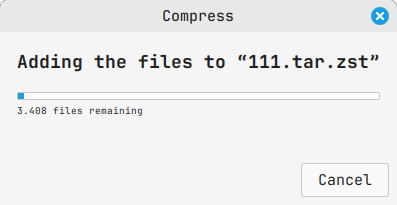
My wish is if I could have some kind of progress bar to show me - How many files is left before the end of the compression
https://i.postimg.cc/t4S2DtpX/Screenshot-from-2024-09-07-12-40-04.png
So can somebody help me to solve this dilemma?
I already checked all around the internet and it looks like the people can't really explain about tar + zstd.
https://redd.it/1fb42qr
@r_bash
How to Replace a Line with Another Line, Programmatically?
Hi all
I would like to write a bash script, that takes the file /etc/ssh/sshd_config,
and replaces the line #Port 22
with the line Port 5000.
I would like the match to look for a full line match (e.g. #Port 22),
and not a partial string in a line
(so for example, this line ##Port 2244 will not be matched and then replaced,
even tho there's a partial string in it that matches)
If there are several ways/programs to do it, please write,
it's nice to learn various ways.
Thank you evry much
https://redd.it/1falc6z
@r_bash
Final script to clean /tmp, improvements welcome!
I wanted to get a little more practice in with bash, so (mainly for fun) I sorta reinvented the wheel a little.
*Quick backstory:*
My VPS uses WHM/cPanel, and I don't know if this is a problem strictly with them or if it's universal. But back in the good ol' days, I just had session files in the /tmp/ directory and I could run tmpwatch via cron to clear it out. But awhile back, the session files started going to:
# 56 is for PHP 5.6, which I still have for a few legacy hosting clients
/tmp/systemd-private-[foo]-ea-php56-php-fpm.service-[bar]/tmp
# 74 is for PHP 7.4, the version used for the majority of the accounts
/tmp/systemd-private-[foo]-ea-php74-php-fpm.service-[bar]/tmp
And since \[foo\] and \[bar\] were somewhat random and changed regularly, there was no good way to set up a cron to clean them.
cPanel recommended this one-liner:
find /tmp/systemd-private*php-fpm.service* -name sess_* ! -mtime -1 -exec rm -f '{}' \;
but I don't like the idea of running `rm` via cron, so I built this script as my own alternative.
*So this is what I built:*
My script loops through /tmp and the subdirectories in /tmp, and runs tmpwatch on each of them if necessary.
I've set it to run via crontab at 1am, and if the server load is greater than 3 then it tries again at 2am. If the load is still high, it tries again at 3am, and then after that it gives up. This alone is a pretty big improvement over the cPanel one-liner, because sometimes I would have a high load when it started and then the load would skyrocket!
In theory, crontab should email the printf text to the root email address. Or if you run it via command line, it'll print those results to the terminal.
I'm open to any suggestions on making it faster or better! Otherwise, maybe it'll help someone else that found themselves in the same position :-)
#!/bin/sh
#################################################
# Save as tmpwatch.sh, then upload to /root and set permission to 0755
#
# To run from SSH:
# bash tmpwatch.sh
#
# To set in crontab from SSH:
# crontab -e
# i (to insert)
# paste or type this to run daily at 1am:
# 0 1 * * * bash tmpwatch.sh
# Save it by pressing Esc, then type :wq and hit Enter
#
# Crontab Format:
# minute hour day month day-of-the-week command
# * means "every"
#
#################################################
# try to run a max of 3 times; 1am, 2am, and 3am
# you can change the 3 to whatever you prefer, I chose this to avoid high traffic times
for attempts in {1..3}
do
# only run if server load is < 3
# you can change the 3 to whatever you prefer, too
if (( $(awk '{ print int($1 * 100); }' < /proc/loadavg) < (3 * 100) ))
then
### Clean /tmp directory
# thanks to @ZetaZoid, r/linux4noobs for the "find" command line
sizeStart=$(nice -n 19 ionice -c 3 find /tmp/ -maxdepth 1 -type f -exec du -b {} + | awk '{sum += $1} END {print sum}')
# if there are files in the /tmp directory, run tmpwatch to remove them
# else, move on to the subdirectories
if [[ -n $sizeStart && $sizeStart -ge 0 ]]
then
nice -n 19 ionice -c 3 tmpwatch -m 12 /tmp
sleep 5
sizeEnd=$(nice -n 19 ionice -c 3 find /tmp/ -maxdepth 1 -type f -exec du -b {} + | awk '{sum += $1} END {print sum}')
if [[ -z $sizeEnd ]]
then
sizeEnd=0
fi
if (( $sizeStart > $sizeEnd ))
then
body+="tmpwatch -m 12 /tmp ...\n"
body+="$sizeStart -> $sizeEnd\n\n"
fi
fi
### Clean /tmp subdirectories
for i in $(ls -d /tmp/systemd-private-*)
do
i+="/tmp"
if [[ -d "$i" ]]
exponential search in bash
https://shscripts.com/exponential-search-in-bash/
https://redd.it/1f9xjaq
@r_bash
Has anyone encountered ' An error occurred in before all hook' when using shellspec?
I have implemented a unit test for a Shell using shellspec. And I am always thrown the above error in 'before all' and 'after all' both. Even though the log contains exit code 0 which basically indicating there is no error none of my tests are executing.
I have added extra logs and also redirected the errors but still I am facing this error and am out of options. I am using the latest version of Shellspec as well.
I am mocking git commands in my test script. But it is quite necessary for my tests as well.
I even checked for the relevent OS type in the setup method
# Determine OS type
OS_TYPE=$(uname 2>/dev/null || echo "Unknown")
case "$OS_TYPE" in
Darwin|Linux)
TMP_DIR="/tmp"
;;
CYGWIN*|MINGW*|MSYS*)
if command -v cygpath >/dev/null 2>&1; then
TMP_DIR="$(cygpath -m "${TEMP:-/tmp}")"
else
echo "Error: cygpath not found" >&2
exit 1
fi
;;
*)
echo "Error: Unsupported OS: $OS_TYPE" >&2
exit 1
;;
esac
Any guidance is immensely appreciated.
https://redd.it/1f9s8b4
@r_bash
lolcat reconfiguration help needed please
Was hoping you could help out a total noob. You may have seen this script - lolcat piped out for all commands. Its fun, it's nice, but it creates some unwanted behavior at times. Its also not my script (im a noob). However, i thought, at least for my purposes, it would be a better script if exclusion commands could be added to the script, for example this script 'lolcats' all commands, including things like 'exit' and prevents them executing. So i'd like to be able to add a list of commands in the *.bashrc script that excludes lolcat from executing, such as 'exit'. Any help is appreciated. Thanks.
lol()
{
if -t 1 ; then
"$@" | lolcat
else
"$@"
fi
}
bind 'RETURN: "\e1~lol \e[4~\n"'
or this one has aliases created, but i'd like to do the opposite, instead of adding every command to be lolcat, create an exclusion list of commands not to be lolcat.
lol()
{
if [ -t 1 ; then
"$@" | lolcat
else
"$@"
fi
}
COMMANDS=(
ls
cat
)
for COMMAND in "${COMMANDS@}"; do
alias "${COMMAND}=lol ${COMMAND}"
alias ".${COMMAND}=$(which ${COMMAND})"
done
https://redd.it/1f9k1q5
@r_bash
Any way to tell if script is ran via command line versus cron?
Inside of a bash script, is there a way to tell whether the script was ran via command line versus crontab?
I know that I can send a variable, like so:
# bash foo.sh bar
And then in the script, use:
if [ $1 -eq "bar" ]
then
# it was ran via command line
fi
but is that the best way?
The goal here would be to printf results to the screen if it's ran via command line, or email them if it's ran via crontab.
https://redd.it/1f93hp3
@r_bash
Running via cronjob, any way to check the server load and try again later if it's too high?
I'm writing a script that I'll run via cronjob at around 1am. It'll take about 15 minutes to complete, so I only want to do it if the server load is low.
This is where I am:
attempt=0
# server load is less than 3 and there have been less than 5 attempts
if (( $(awk '{ print $1; }' < /proc/loadavg) < 3 && $attempt < 5))
then
# do stuff
else
# server load is over 3, try again in an hour
let attempt++
fi
The question is, how do I get it to stop and try again in an hour without tying up server resources?
My original solution: create an empty text file and touch it upon completion, then the beginning of the script would look at the lastmodified time and stop if the time is less than 24 hours. Then set 5 separate cronjobs, knowing that 4 of them should fail every time.
Is there a better way?
https://redd.it/1f90a2b
@r_bash
single quote (apostrophe) in filename breaks command
I have a huge collection of karaoke (zip) files that I'm trying to clean up, I've found several corrupt zip files while randomly opening a few to make sure the files were named correctly. So I decided to do a little script to test the zips, return the lines with "FAILED" and delete them. This one-liner finds them just finefind . -type f -name "*.zip" -exec bash -c 'zip -T "{}" | grep FAILED' \;
But theres the glaring error "sh: 1: Syntax error: Unterminated quoted string" every time grep matches one, so I can't get a clean output to use to send to rm. I've been digging around for a few days but haven't found a solution
https://redd.it/1f8fmv5
@r_bash
This is official Google script
https://redd.it/1f89ord
@r_bash
Quitting a Script without exiting the shell
I wrote a simple bash script that has a series of menus made with if statements. If a user selects an invalid option, I want the script to quit right away.
The problem is that exit kills the terminal this script is running in, & return doesn’t work since it’s not a “function or sources script.”
I guess I could put the whole script in a while loop just so I can use break in the if else statements, but is there a better way to do this?
What’s the proper way to quit a script? Thanks for your time!
UPDATE:
I’m a clown. I had only ever run exit directly from a terminal, & from a sourced script. I just assumed it always closed the terminal. My bad.
I really appreciate all the quick responses!
https://redd.it/1f85r2h
@r_bash